
Increase Image Size in KB
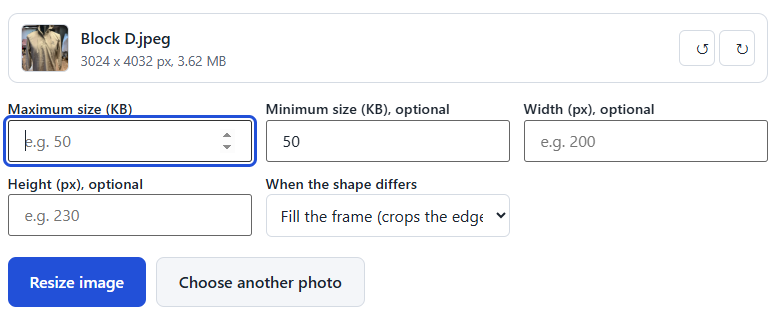
Need to increase image size in KB online? DocSizer helps you make a photo or signature meet a minimum file-size requirement for online forms, job applications and exam registrations. Choose your image, set the required minimum size, and download the result. You can also check the final file size before uploading it to a form.
Your image is processed in your browser and stays on your device.
How to increase an image to a minimum size in KB
- Choose your photo or signature. JPG, PNG and WebP are supported.
- The minimum size is set to 50 KB. Change it to the number your form asks for.
- If the form also gives a maximum size, enter that too. If it gives a size in pixels, enter the width and height.
- Press Resize image, check the size shown, and download the new JPG.
Increase size in KB, or in pixels?
This page raises the file size in KB, which is what forms mean by a minimum size. The picture looks the same. To make a picture bigger in pixels, use the photo and signature resizer and enter a larger width and height. A bigger picture can’t gain detail it doesn’t have, so a large enlargement looks soft.
What this does, and what it does not
- The tool saves your picture as a JPG at high quality. If the file is still below your minimum, it adds invisible data until it reaches the size. The picture does not look different and does not become sharper.
- Many portals only check the size in KB, and this is what they need. A picture with more real detail needs a better original photo, so retake it in daylight if you can.
- Always enter both the minimum and the maximum when your form gives a range, for example 50 to 100 KB to increase image size in kb.
- Size in KB depends on the picture and its width and height. A very small picture may need its width and height raised first.
- Check the final size before you upload. Forms differ, so use the numbers on your own form.
Frequently asked questions
Why does my form say the file is too small?
Some portals set a minimum size as well as a maximum. A photo that has been compressed a lot, or a small picture, can fall under it.
How do I increase a photo to 50 KB?
Enter 50 as the minimum size and press Resize image. If the saved file is below 50 KB, the tool brings it up to that size.
Will the picture look better?
No. The size goes up, but the picture keeps the detail it already had. For a sharper picture, retake the photo in good light.
What if my form needs a minimum and a maximum?
Enter both. The tool keeps the file between them.
Is my photo uploaded?
No. The photo is handled in your browser, on your own device, and is never sent to a server.
What if I need to make a photo smaller instead?
Use the photo and signature resizer and enter a maximum size in KB.
What is a KB increaser?
A tool that raises a file’s size in KB, for forms that need a minimum size. This page does that.
How do I increase JPG size in KB?
Add the JPG, enter the minimum size your form asks for, press Resize image, and download the result.
Can I increase a signature JPG to 50 KB?
Yes. Use the same tool with your signature image, and enter the minimum size.
Will a bigger KB make the picture clearer?
No. The size goes up, but the detail stays as it was. For a clearer picture, retake the photo in good light.
How do I keep the quality when I resize to 50 KB?
The tool keeps the highest quality that fits under the limit. Start from the original photo, not a copy sent over a messaging app, and use a smaller width and height if your form allows it. A smaller picture holds up better at a small file size.