
Resize Photo to 50KB Online
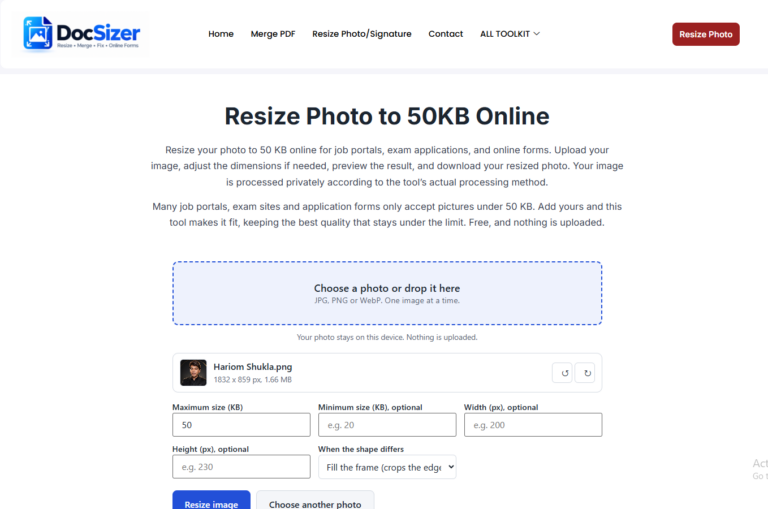
Resize your photo to 50 KB online for job portals, exam applications, and online forms. Upload your image, adjust the dimensions if needed, preview the result, and download your resized photo. Your image is processed privately according to the tool’s actual processing method.
Many job portals, exam applications, and online forms have specific photo size requirements. Use this free tool to resize your photo to 50KB when your form requires it. Always check the size and dimensions specified by your application.
How to Resize a Photo to 50KB Online
- Choose your photo or signature from your phone or computer.
- The limit is already set to 50 KB. Add a width and height only if the form asks for them.
- Press Resize image and look at the preview.
- Download the new JPG and upload it to the form.
Getting a good-looking 50 KB image
- Start from the original photo, not a screenshot or a copy that was already compressed.
- If the result looks blurry, enter a smaller width and height. A smaller picture holds up better at a small file size.
- Check the form for a required size in pixels, and for a minimum size in KB. Enter them in the boxes if there are any.
- Different limit, such as 20 KB or 100 KB? Use the general resizer linked below.
Frequently asked questions
How do I reduce an image to 50 KB?
Add your image and press Resize image. The tool lowers the quality just enough to get under 50 KB, and reduces the pixel size only if it has to.
Is 50 KB enough for a clear photo?
For a small passport-style photo it usually is. A face photo at around 200 x 230 pixels often fits well within 50 KB. Larger pictures need more compression.
My form needs a different size. What now?
Use the general Resize photo or signature tool. You can type any limit in KB and any width and height there.
Does it work on a phone?
Yes. It works in the browser on Android and iPhone. Choose a picture from your gallery or take a new one.
Is my picture kept anywhere?
No. The picture is processed on your device and never sent to a server.