Convert PDF Pages to JPG
Use this free PDF to JPG converter to turn PDF pages into JPG images online. Choose to convert all pages or select specific pages, adjust image quality, and download your images individually or together. Your PDF is processed on your device and is never uploaded.
How to convert a PDF to JPG
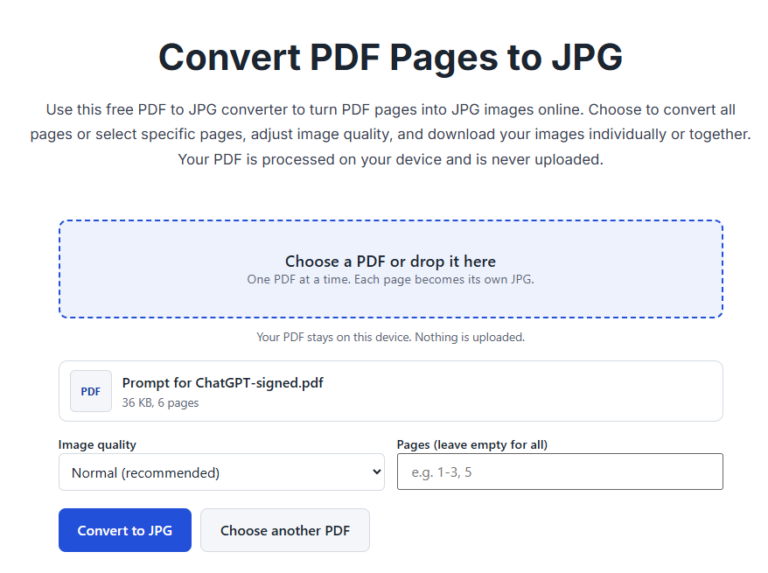
- Choose your PDF, or drop it onto the box.
- Pick the image quality. Normal suits most uses.
- To convert only some pages, type them in the pages box, for example 1-3, 5. Leave it empty for all pages.
- Press Convert to JPG, then download the pages one by one or use Download all.
Good to know
- Each page becomes its own JPG, named after your file and the page number.
- Small file gives lighter images, Normal is clear for reading, and High detail gives the sharpest pages with bigger files.
- Download all starts several downloads in a row. Your browser may ask you to allow multiple downloads. If some are blocked, download the pages one by one.
- Up to 50 pages are converted at a time. For longer PDFs, use the pages box to do it in parts.
- If a form wants an image under a size limit, convert the page here, then use the photo and signature resizer to set the size.
When should you convert PDF to JPG?
Converting a PDF to JPG can be useful when you need to share a page as an image, upload a document page to a website that accepts images, or insert a document page into a presentation.
Can I convert only selected PDF pages?
Yes. Enter the page numbers or page range in the pages field, following the format shown in the tool. Leave the field empty if you want to convert all pages.
How do I get clearer JPG images?
Choose the Normal quality setting for everyday use or High detail when text and fine details matter. Higher-quality images may produce larger files.
Can I convert a multi-page PDF?
Yes. The tool converts pages into separate JPG images. Download individual images or use Download all if your browser allows multiple downloads.
Frequently asked questions
Is this tool free?
Yes. There is no sign-up and no watermark on your images.
Is my PDF uploaded?
No. The pages are drawn in your browser, on your own device, and never sent to a server.
Which quality should I choose?
Normal works for most documents. Choose High detail for small print, and Small file when you need lighter images.
Can I get all pages in one image?
Not at the moment. Each page becomes its own JPG.
Why does my browser ask about multiple downloads?
Download all saves several files at once, and browsers often ask first. Allow it, or download each page with its own button.
Can I make the JPG smaller?
Yes. Use the photo and signature resizer to set a size in KB and pixels.